Software
Now we're ready to try the FanatIIC software. Initially I wrote
the control software in BASIC. The program is on the download page, and serves
as a useful tutorial. I suggest you have a look at it with your favourite
editor. At the core of the program is PROCmessage. This is the WIMP message
handler, and it picks out any ThermIIC broadcast messages, which contain
the temperature data collected by ThermIIC. Each time the program loops
around polling the WIMP it checks these temperatures against a set of rules
stored in data statements at the head of the program. The rules say which
thermometer values to check, and the temperatures at which to start each fan.
Having determined which fans should be running, a data byte is sent to the
8574(A) by FNset_dio. Here the address is hard coded to &7E, and you should
change this to suit your setup.
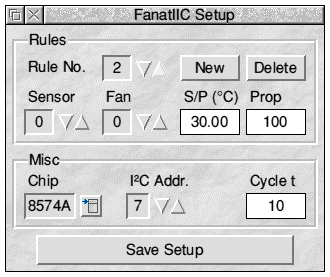
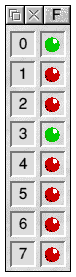
The original FanatIIC, in BASIC, worked fine, but I fancied something a bit "posher". So I re-wrote it in C, using the Acorn Toolkit for user interfacing. At heart the C version is much the same as the earlier attempt. Now though, the rules are held in a doubly-linked list, set up by a user dialogue, so that it can grow to hold as many rules as you like. The rule list can be saved to a file. Also, there is now a set of "LEDs" in a window to show the outputs going on and off. The setup and output windows are shown in figure 6.
To reach the setup dialogue select Setup from the menu or adjust-click the iconbar icon. The first thing to do is set the correct chip type and I²C sub-address. The latter is simply the number set on A0 - A2 of the 8574. Leave Cycle t (cycle time) at its default for now. Start entering your first rule by clicking New. The entry fields will become available, and you can select the sensor to monitor, the fan to activate, and the temperature set-point for the rule. If you want to monitor more sensors or activate more fans simply add some more rules. There is nothing to stop you having several rules monitoring the same sensor. If multiple rules turn on a sensor, they will work in summation.
Both versions of the FanatIIC program implement a simple form of proportional control. Instead of the fans being just on or off whilst the temperature is above or below the rule set-points they are switched repeatedly. They can be off most of the time and switched on just occasionally, or they can be mostly on. The greater the "error" in the temperature the greater the drive level; the longer the fans are on compared with off. This is the use of the Prop (proportional) value. It sets the percentage of a "cycle time" the fan is on per degree of temperature error. You might want to adjust the cycle time if the system proves very quick or very slow to respond.
Setting up the proportional value is tricky. If you set it too high the output will be driven hard straight away the temperature goes past the set-point. This will probably result in overshoot as the fans blast the temperature back the other way. But if too small a value is used it will take ages for there to be much of a response so that an equilibrium can become established. What is more, if there is a perturbation - a jump in the temperature - the drive will be too slow to respond adequately. Real control systems often use a more sophisticated approach, taking into account the "inertia" of the controlled system, and varying the response as conditions change. Even then it is very tricky to get it right.
Finally, note that the sensor value can go negative. If set to -1 it reads the number of seconds into the current minute, counting from program start. -2 reads the number of minutes into the hour. These can be used to occasionally run an output regardless of temperature readings.
Despite the name you could drive things other than fans. If you added relays you could drive pretty much anything you like, even devices that take a lot of current. For example, you could use low-value high-power resistors as heaters. In this case the sense of the output switching must be reversed. This is achieved by entering negative proportional values.
Of course the hardware may be used independently of the
FanatIIC software. Just copy FNset_dio and FNdo_iic into your own program,
or re-write them.